Unity Catalog
Overview
Unity Catalog OSS is an open-source data catalog for lakehouse architectures. It provides a unified metadata layer for managing data assets across different compute engines and storage systems. Unity Catalog enables centralized governance, fine-grained access control, and data discovery for your data lake.
In the context of Ilum, Unity Catalog serves as an alternative to Hive and Nessie catalogs, offering a modern approach to metadata management with built-in governance features. Unity Catalog organizes data into a three-level namespace: catalog → schema → table, providing clear data organization and isolation.
Unlike Hive, which only tracks the latest state of tables, Unity Catalog provides comprehensive audit logging and lineage tracking. Unlike Nessie's Git-like approach with branches and commits, Unity Catalog focuses on governance, access control, and data discovery across your organization.
Unity Catalog vs. Other Data Catalogs
Here's how Unity Catalog compares with Hive and Nessie:
-
Three-Level Namespace: Unity Catalog uses
catalog.schema.tablehierarchy, providing better data organization compared to Hive'sdatabase.tablestructure. -
Built-in Governance: Native support for fine-grained access control, data lineage, and audit logging. These features require external tools with Hive.
-
Centralized Management: Unity Catalog provides a unified governance layer across multiple workspaces and compute engines.
-
Modern Architecture: Designed for cloud-native lakehouse architectures with support for modern table formats like Iceberg and Delta Lake.
-
No Branching: Unlike Nessie, Unity Catalog does not support Git-like branching and version control. For versioning, rely on table-format-specific features (Iceberg snapshots, Delta time travel).
-
REST API: Unity Catalog exposes a comprehensive REST API for programmatic access and integration with external tools.
Core Concepts in Unity Catalog
Three-Level Namespace
Unity Catalog organizes data in a three-level hierarchy:
- Catalog - The top-level container for organizing data assets
- Schema (also called Database) - A logical grouping of tables and views within a catalog
- Table - The actual data table or view
Example: my_catalog.sales_db.transactions
Metastore
The Unity Catalog Metastore stores all metadata about catalogs, schemas, tables, and their access policies. It also manages:
- Data lineage information
- Audit logs
- Access control policies
- User and group permissions
Storage
Unity Catalog supports various storage backends:
- Amazon S3 and the bundled S3-compatible providers (RustFS, MinIO)
- Azure Data Lake Storage (ADLS)
- Google Cloud Storage (GCS)
- HDFS (Hadoop Distributed File System)
Using Unity Catalog in Ilum
Known Limitation: Unity Catalog OSS integration with the bundled S3-compatible providers (MinIO, and by extension RustFS until upstream coverage is confirmed) does not currently work correctly. This is a known issue with Unity Catalog OSS rather than with Ilum. We recommend using external S3-compatible storage or waiting for a fix in future Unity Catalog releases.
For production deployments, consider using cloud-native S3 services (AWS S3, GCS, ADLS) rather than the bundled providers when Unity Catalog is the metastore. For broader storage backend guidance, refer to Object Storage in Ilum.
Ilum supports Unity Catalog as an alternative metastore for Spark jobs, SQL queries, and data pipelines. When configured, Unity Catalog provides centralized metadata management and governance for your data lakehouse.
Enabling Unity Catalog in Ilum
To enable Unity Catalog in Ilum, you need to set the following Helm values:
helm upgrade \
    --set ilum-core.metastore.enabled=true \
    --set ilum-core.metastore.type="unity" \
    --set ilum-unity-catalog.enabled=true \
    --reuse-values ilum ilum/ilum
After running the helm upgrade command, navigate to the Edit Cluster tab for the cluster where you want to use the catalog and select it in the General metastore dropdown:
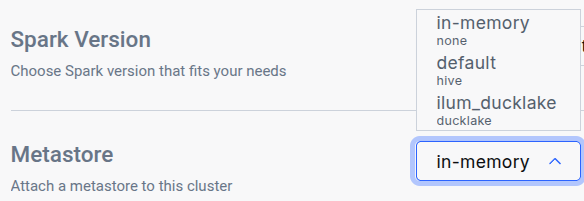
This configuration:
- Enables the metastore integration in Ilum Core
- Sets Unity Catalog as the default metastore type
- Deploys the Unity Catalog OSS server
Using the Preconfigured Spark Image
The easiest way to use Unity Catalog with Ilum is to use our preconfigured Spark image that includes all necessary Unity Catalog dependencies and configurations.
In your cluster configuration, specify the following Docker image:
image: ilum/spark:3.5.8-unity
This image comes with:
- Unity Catalog Spark connector pre-installed
- Required Delta Lake extensions
- Optimized configuration for Unity Catalog integration
- All necessary dependencies for seamless operation
When using this image, Ilum automatically handles the Unity Catalog configuration, so you don't need to manually set Spark properties or add additional JARs.
Basic SQL Operations
Once Unity Catalog is enabled, you can use standard SQL commands to manage catalogs, schemas, and tables:
Spark Configuration for Unity Catalog
If you run Spark manually, you'll need to configure it for Unity Catalog. However, Ilum handles this for you automatically when Unity Catalog is enabled in your Helm values.
For reference, the key configuration parameters include:
# Unity Catalog configuration
spark.sql.catalog.unity_catalog=io.unitycatalog.spark.UCSingleCatalog
spark.sql.catalog.unity_catalog.uri=http://ilum-unity-catalog:8080
spark.sql.catalog.unity_catalog.token=

# Optional: Set Unity Catalog as default
spark.sql.defaultCatalog=unity_catalog

# Required extensions for Delta Lake support
spark.sql.extensions=io.delta.sql.DeltaSparkSessionExtension
Note: The unity_catalog name in these properties is the catalog identifier in Spark. You can use a different name if needed by replacing unity_catalog with your preferred catalog name.
Setting up Unity Catalog in Ilum
Normally, setting up Unity Catalog requires:
- Deploying the Unity Catalog server
- Configuring a backing database for metadata storage
- Setting up storage credentials and access policies
- Configuring security and authentication
- Integrating with your compute engines
Ilum automates most of these steps! When you enable Unity Catalog via Helm, Ilum provisions the Unity Catalog server and handles the basic configuration for you.
Enabling Unity Catalog
To enable Unity Catalog in Ilum, use these Helm flags:
helm upgrade \
    --set ilum-core.metastore.enabled=true \
    --set ilum-core.metastore.type="unity" \
    --set ilum-unity-catalog.enabled=true \
    --reuse-values ilum ilum/ilum
Unity Catalog Storage Configuration
Known Issue: Unity Catalog OSS does not currently work correctly with MinIO storage. This is a limitation of Unity Catalog OSS, not Ilum.
Recommended Alternatives:
- Use AWS S3 for production deployments
- Use Google Cloud Storage (GCS)
- Use Azure Data Lake Storage (ADLS)
- Wait for Unity Catalog OSS updates that resolve MinIO compatibility
If you need to use MinIO, we recommend using Hive or Nessie catalogs instead.
Unity Catalog supports various storage backends. While Ilum pre-configures MinIO by default, the Unity Catalog OSS and MinIO integration currently has compatibility issues.
Storage Configuration Structure
Unity Catalog storage is configured using the storage section in your Helm values. The configuration includes a root storage path and credentials for accessing your storage backend.
Using AWS S3
For production deployments, we recommend using AWS S3. You can configure S3 storage in two ways:
Option 1: Using Kubernetes Secrets (Recommended)
First, create a Kubernetes secret with your AWS credentials:
kubectl create secret generic unity-s3-credentials \
    --from-literal=accessKey='your_access_key' \
    --from-literal=secretKey='your_secret_key'
Then configure Unity Catalog to use this secret:
ilum-unity-catalog:
  enabled: true
  storage:
    modelStorageRoot: "s3a://your-bucket/unity-catalog/"
    credentials:
      s3:
        - bucketPath: s3://your-bucket
          region: us-east-1
          awsRoleArn: ""  # Leave empty if using access keys
          credentialsSecretName: unity-s3-credentials
          accessKeySecretKey: accessKey
          secretKeySecretKey: secretKey
Option 2: Using IAM Role (AWS EKS)
If running on AWS EKS, you can use IAM roles for service accounts:
ilum-unity-catalog:
  enabled: true
  storage:
    modelStorageRoot: "s3a://your-bucket/unity-catalog/"
    credentials:
      s3:
        - bucketPath: s3a://your-bucket
          region: us-east-1
          awsRoleArn: "arn:aws:iam::123456789012:role/unity-catalog-role"
          credentialsSecretName: ""
          accessKeySecretKey: ""
          secretKeySecretKey: ""
Using MinIO (Limited Support)
While MinIO support is limited, you can configure it for development/testing:
ilum-unity-catalog:
  enabled: true
  storage:
    modelStorageRoot: "s3a://ilum-data/unity-catalog/"
    credentials:
      s3:
        - bucketPath: s3://ilum-data
          region: us-east-1
          awsRoleArn: ""
          credentialsSecretName: ilum-minio
          accessKeySecretKey: root-user
          secretKeySecretKey: root-password
This MinIO configuration is provided for reference but may not work correctly in production. Use AWS S3, GCS, or ADLS for production deployments.
Using Google Cloud Storage (GCS)
For GCS, create a secret with your service account credentials:
kubectl create secret generic unity-gcs-credentials \
    --from-file=credentials.json=/path/to/service-account-key.json
Then configure Unity Catalog:
ilum-unity-catalog:
  enabled: true
  storage:
    modelStorageRoot: "gs://your-gcs-bucket/unity-catalog/"
    credentials:
      gcs:
        - bucketPath: gs://your-gcs-bucket
          credentialsSecretName: unity-gcs-credentials
          serviceAccountKeySecretKey: credentials.json
Using Azure Data Lake Storage (ADLS)
For ADLS, create a secret with your storage account credentials:
kubectl create secret generic unity-adls-credentials \
    --from-literal=accountName='your-storage-account' \
    --from-literal=accountKey='your-account-key'
Then configure Unity Catalog:
ilum-unity-catalog:
  enabled: true
  storage:
    modelStorageRoot: "abfss://[email protected]/unity-catalog/"
    credentials:
      adls:
        - containerPath: abfss://your-container@your-account.dfs.core.windows.net
          credentialsSecretName: unity-adls-credentials
          accountNameSecretKey: accountName
          accountKeySecretKey: accountKey
Best Practices and Recommendations
- Use Three-Level Namespace: Organize your data with meaningful catalog and schema names for better discovery and governance.
- Separate Environments: Create separate catalogs for dev, staging, and production environments.
- Leverage Schemas: Use schemas to group related tables and views logically.
- Monitor Access Logs: Unity Catalog provides comprehensive audit logging. Use it for security and compliance.
- For Version Control, Use Table Formats: Unity Catalog doesn't support branching. Use Iceberg snapshots or Delta Lake time travel for versioning.
- Storage Considerations: Currently, avoid the bundled S3-compatible providers (MinIO; RustFS until coverage is confirmed) for Unity Catalog deployments. Use cloud-native S3-compatible services instead. For provider selection, refer to Object Storage in Ilum.
- Plan for Governance: Take advantage of Unity Catalog's built-in access control and lineage features from the start.
Comparison Matrix
| Feature | Hive Catalog | Nessie Catalog | Unity Catalog |
|---|---|---|---|
| Namespace Levels | 2 (db.table) | 2 (db.table) | 3 (catalog.schema.table) |
| Version Control | No | Yes (Git-like) | No |
| Branching | No | Yes | No |
| Access Control | Basic | Basic | Fine-grained |
| Audit Logging | Limited | Limited | Comprehensive |
| Data Lineage | No | No | Yes |
| Multi-table Transactions | No | Yes | No |
| Time Travel | Via format | Via format | Via format |
| REST API | Limited | Yes | Comprehensive |
| Bundled storage (RustFS / MinIO) | ✅ Yes | ✅ Yes | ⚠️ Limited (known issue) |
Learn More
For more on using Unity Catalog, see the official documentation:
For detailed Ilum configuration and Helm reference, visit the Ilum Getting Started guide.
Unity Catalog in Ilum provides a modern, governance-focused approach to metadata management, giving you centralized control, comprehensive audit trails, and fine-grained access control for your data lakehouse.