Resource Control & Governance
Effective resource control is the backbone of a stable, multi-tenant data platform. In data-intensive environments running distributed workloads like Apache Spark, unchecked resource consumption leads to the "noisy neighbor" problem, where a single job creates resource starvation for the entire cluster.
Ilum integrates natively with Kubernetes Resource Quotas and Limit Ranges to enforce strict governance at the namespace level. This ensures fair scheduling, cost predictability, and operational stability for your data pipelines.
Kubernetes Resource Primitives
Understanding the underlying Kubernetes primitives is essential for configuring effective governance in Ilum.
Resource Quotas (Namespace Hard Limits)
Resource Quotas provide a mechanism to set aggregate constraints across a specific namespace. They act as a hard ceiling for total resource consumption. When a limit is reached, the Kubernetes API server rejects any new pod creation requests that would violate the quota.
Key dimensions include:
- Compute Resources: Limits on the total sum of
cpuandmemorythat can be requested by all pods in the namespace. - Object Counts: Limits on the total number of specific resources, such as
pods,persistentvolumeclaims, orservices.
In a Spark context, Resource Quotas prevent a single tenant or project from monopolizing the cluster's capacity, forcing jobs to queue or fail fast rather than destabilizing other workloads.
Limit Ranges (Pod-Level Constraints)
Limit Ranges operate at a granular level, defining constraints for individual Pods or Containers within a namespace. They serve two critical functions:
- Enforcement: They ensure that every pod falls within a specific size range (Min/Max). This prevents users from creating "tiny" useless pods or massive pods that cannot be scheduled.
- Default Injection: If a user (or a Spark job) submits a pod without specifying resource requests/limits, the Limit Range injects default values. This is crucial for maintaining cluster hygiene and preventing "best-effort" pods from consuming excessive resources unpredictably.
Impact on Spark Workloads
Configuring these primitives directly impacts how Apache Spark jobs—comprising Driver and Executor pods—are scheduled and executed.
1. Mapping Spark Configs to Kubernetes Resources
When you submit a Spark job via Ilum, Spark configurations translate directly to Kubernetes resource specifications:
spark.driver.memory+spark.driver.memoryOverhead→ Pod Memory Request/Limitspark.executor.cores→ Pod CPU Request/Limit
If the sum of these values across all executors exceeds the Resource Quota, Kubernetes will block the creation of new executor pods.
2. Admission Control & Defaults
If a Data Scientist submits a job without explicit resource sizing:
- Without Limit Range: The pods may be created with no guaranteed resources (BestEffort QoS), making them the first targets for eviction during node pressure.
- With Limit Range: The pods automatically inherit the
defaultRequestanddefaultLimitdefined in Ilum. This guarantees a baseline Quality of Service (QoS) without requiring verbose configuration from the user.
3. The Importance of Limit Request Ratio
The Max Limit Request Ratio is a powerful setting for overcommitment control. For example, a ratio of 2 means a pod requesting 1GB of memory cannot have a limit higher than 2GB. This prevents aggressive oversubscription where the sum of limits vastly exceeds physical capacity, leading to node instability and OOM (Out Of Memory) kills.
Configuration in Ilum
Ilum provides a streamlined interface to manage these Kubernetes objects directly within the cluster settings, abstracting the YAML complexity while retaining full control.
Resource Quota Settings
Navigate to Cluster Settings to define the aggregate boundaries for a namespace.
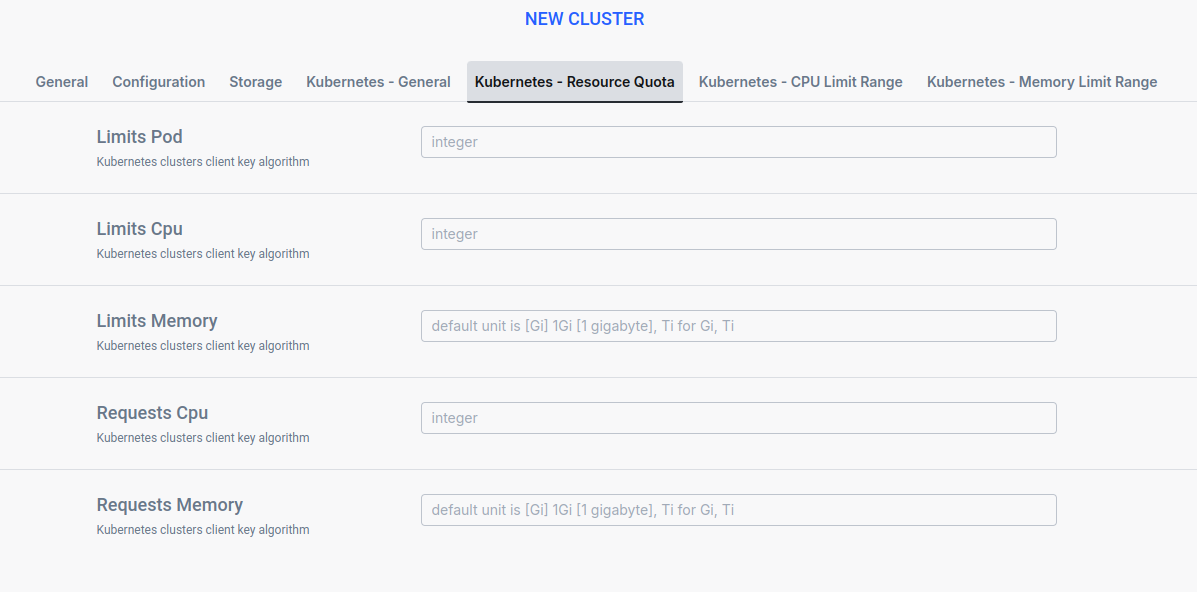
- Limits Pod: The maximum number of Pods allowed in the namespace. Useful for limiting the total concurrency of Spark executors.
- Requests CPU / Memory: The sum of resource requests (guaranteed capacity) cannot exceed this value. This dictates the minimum guaranteed capacity for the tenant.
- Limits CPU / Memory: The sum of resource limits (maximum potential usage) cannot exceed this value. This caps the potential burst capacity.
Limit Range Settings
Define the rules for individual pods within the namespace.
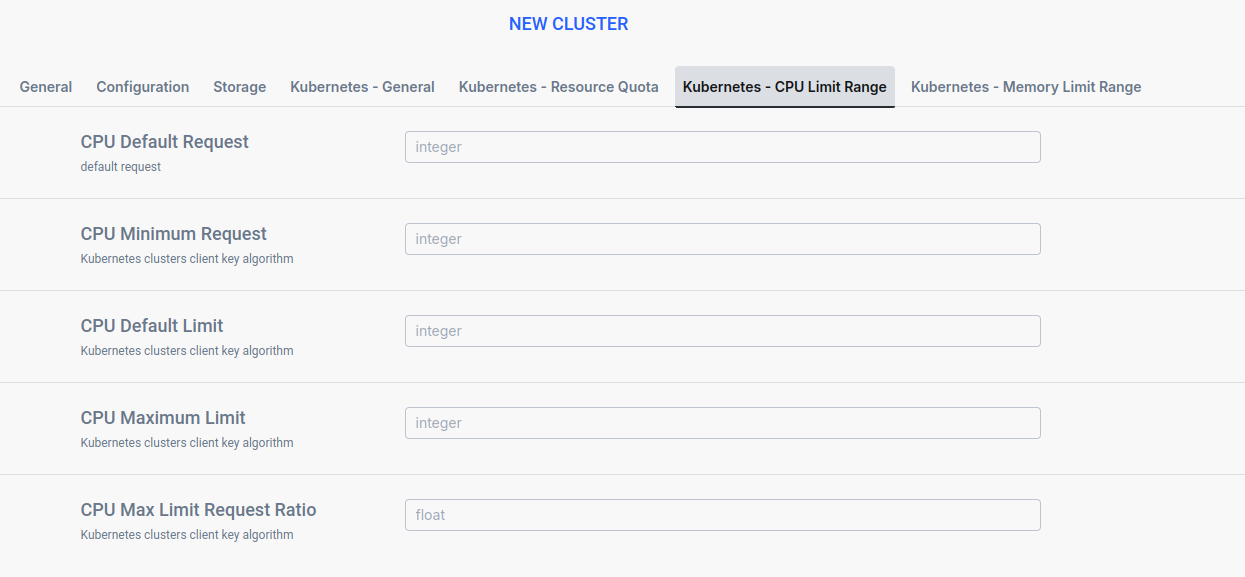
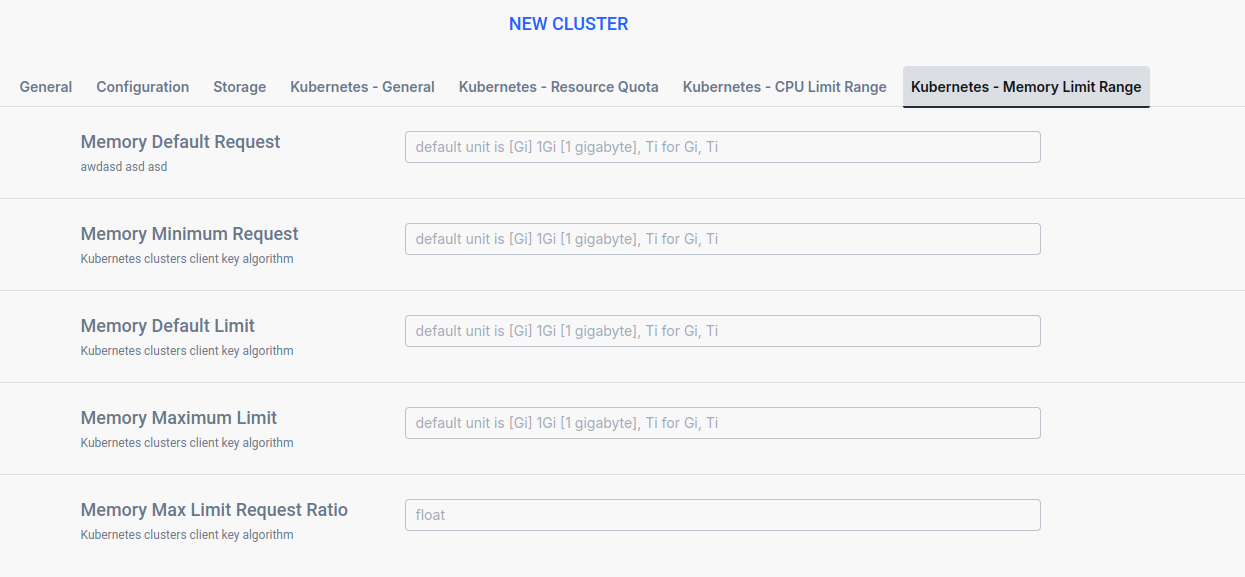
- Default Request: The CPU/Memory value assigned to a pod if none is specified.
- Recommendation: Set this to a sensible baseline for a small Spark executor (e.g., 1 Core, 2GB Memory).
- Default Limit: The upper limit assigned if none is specified.
- Minimum: The smallest allowable pod size.
- Use Case: Prevent the creation of non-functional executors (e.g., < 500MB memory) that would crash immediately.
- Maximum: The largest allowable pod size.
- Use Case: Prevent a user from requesting a single pod larger than the biggest available node in your physical cluster.
- Max Limit Request Ratio: The maximum multiplier between request and limit.
- Use Case: Enforce predictable bursting. A ratio of 1.0 ensures "Guaranteed" QoS.
Troubleshooting Resource Constraints
When rigorous resource controls are in place, users may encounter specific errors. Understanding these helps in rapid diagnosis.
Scenario 1: Job Stuck in Pending State
- Symptom: Spark Driver is running, but Executors remain in
Pendingstatus. - Cause: The namespace Resource Quota for
requests.cpuorrequests.memoryhas been exhausted. - Resolution:
- Check current usage in Ilum Dashboard.
- Increase the Namespace Quota if capacity allows.
- Enable Dynamic Allocation in Spark to release idle executors, freeing up quota for other jobs.
Scenario 2: "Forbidden" Error on Submission
- Error:
403 Forbidden: exceeded quota: ... - Cause: The job submission itself requests more resources than the remaining quota available.
- Resolution: The job cannot start. Reduce the job size (fewer instances or smaller resource profile) or wait for other jobs to finish.
Scenario 3: Pod Creation Refused (Limit Range)
- Error:
Pod "..." is invalid: spec.containers[0].resources.requests: Invalid value: "..." - Cause: The job requested a pod size that violates the Minimum or Maximum constraints in the Limit Range.
- Resolution: Adjust the
spark.executor.memoryorspark.executor.coresto fall within the allowed range defined in Ilum settings.
Multi-Tenant Concurrency
In multi-tenant environments, managing concurrent access across teams and workloads is essential for maintaining predictable performance. Ilum provides several mechanisms to ensure fair resource sharing and prevent workload interference.
Namespace-Based Tenant Isolation
Each tenant or team operates within a dedicated Kubernetes namespace with its own Resource Quotas and Limit Ranges. This provides hard isolation boundaries:
- Concurrent job limits: The
podsquota directly controls the maximum number of concurrent Spark executors (and thus concurrent query capacity) per tenant - Resource guarantees: CPU and memory quotas ensure each tenant has reserved capacity regardless of other tenants' workloads
- Burst control: Limit Ranges prevent individual jobs from consuming disproportionate resources within a tenant's namespace
Session Isolation per Engine
Each SQL engine in ilum manages sessions independently:
| Engine | Session Model | Concurrency Characteristics |
|---|---|---|
| Spark SQL | One Spark session per user/query | Each session gets dedicated executors within namespace quota |
| Trino | Shared coordinator, distributed workers | High concurrency; multiple queries share the worker pool |
| DuckDB | Embedded, in-process | Single-threaded per session; ideal for lightweight queries |
Controlling Concurrent Queries
For Spark-based sessions, control concurrency through executor limits:
# Limit maximum concurrent executors per session
spark.dynamicAllocation.maxExecutors=5

# Limit total cores per executor
spark.executor.cores=2
Combined with namespace Resource Quotas, these settings ensure that no single user's queries can monopolize cluster resources.
Use Trino for high-concurrency ad-hoc analytics workloads. Trino's shared-nothing MPP architecture handles many concurrent queries more efficiently than Spark, which requires per-session executor allocation.