Notebooks in Ilum
Overview
Ilum supports two powerful, enterprise-ready notebook environments: Jupyter (JupyterLab/JupyterHub) and Zeppelin.
Both environments enable users to create interactive, executable documents that combine code, results, rich text, and dynamic visualizations—making them essential tools for data science, analytics, and engineering workflows. Ilum ensures these environments are tightly integrated with cluster resources, Spark, data storage, and version control.
Supported Notebook Environments
JupyterLab
- JupyterLab is a modern, flexible web-based IDE for notebooks and data applications.
- It runs in single-user mode: perfect for experimentation, prototyping, and personal data projects.
- In Ilum, JupyterLab is provided as the core user interface within each JupyterHub user's workspace.
JupyterHub
- JupyterHub is the enterprise, multi-user orchestrator for JupyterLab environments.
- It manages authentication (LDAP/SSO), user isolation, spawning, and centralized resource management on Kubernetes.
- Each authenticated user receives a private, persistent JupyterLab workspace with built-in Spark and Git integration.
- JupyterHub is optional in Ilum and can be enabled via Helm.
Zeppelin
- Zeppelin is a multi-language notebook environment that emphasizes Spark analytics, visualizations, and dashboards.
- It supports a wide array of interpreters and provides flexible visualization out of the box.
- Zeppelin is optional in Ilum and can be enabled via Helm.
Key Differences and Typical Use Cases
| Feature / Aspect | JupyterLab (Standalone) | JupyterHub (Multi-user) | Zeppelin |
|---|---|---|---|
| User Model | Single user | Multi-user (centralized) | Single user |
| Authentication | None / local only | LDAP / SSO via Ilum | None / local only |
| Resource Management | Local server | Centralized via Kubernetes | Local server |
| Workspace | Local user environment | Per-user isolated workspace | Local user environment |
| Spark Integration | Sparkmagic plugin | Sparkmagic plugin | Livy Interpreter |
| Version Control | Optional | Built-in with Gitea (per user repo) | Optional / not integrated |
| Collaboration | Git (share via repo), export | Git (share via repo), export | Share notebooks, export |
| Language Support | Python, R, Bash, Scala, SQL | Python, R, Bash, Scala, SQL | Python, Scala, SQL, Bash, others (interpreters) |
| Visualization | Jupyter widgets, matplotlib, etc. | Jupyter widgets, matplotlib, etc. | Built-in visualizations, dashboards |
| Recommended for | Prototyping, local analysis | Team workflows, reproducible research, secure enterprise analytics | Prototyping, local analysis |
Environment Selection Guide
| Use Case | JupyterLab | JupyterHub | Zeppelin |
|---|---|---|---|
| Personal prototyping/experiments | ✓ | ✓ | ✓ |
| Multi-user, secure, enterprise deployments | ✓ | ||
| Centralized resource & user management | ✓ | ||
| Integrated Git version control | ✓ | ✓ (per user) | |
| Ad-hoc exploration and dashboards | ✓ | ✓ | ✓ |
| Advanced Python/R data science workflows | ✓ | ✓ | |
| Spark jobs from notebooks (via Livy) | ✓ | ✓ | ✓ |
| Collaboration via Git | ✓ | ✓ | (manual sharing) |
How Notebook Environments Work in Ilum
- JupyterHub provides a central portal and login for users. After LDAP/SSO authentication, each user gets a personal JupyterLab environment on the cluster, with isolated storage and a pre-configured Spark integration. All code, notebooks, and output are private by default, but can be shared via Git (Gitea).
- JupyterLab is the UI each user interacts with—write code, run cells, visualize data, and manage files, all from the browser.
- Zeppelin can be enabled as an alternative, supporting multi-language analytics and fast, interactive dashboards. Zeppelin leverages Livy interpreters for Spark, and supports SQL and many other interpreters.
For a technical breakdown of the architecture and flow, see:
Ilum Integration with Notebooks via Ilum Livy Proxy
To communicate with Spark, notebooks require specific plugins.
In Jupyter, this is achieved through magic commands — special syntax expressions such as %%magic or %magic that alter a code block's behavior. For example, %%spark enables Spark magic, allowing the block to execute Spark code using the Ilum Code Service.
Zeppelin, on the other hand, has a different architecture. It uses interpreters to process code in each block, with each interpreter designed for a specific language or service. For Spark, Zeppelin uses a dedicated Spark interpreter.
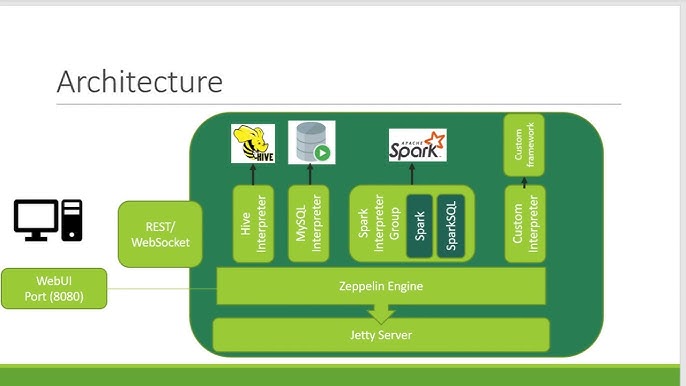
But how does Ilum connect Jupyter’s Spark magic and Zeppelin’s interpreters to manage jobs and organize them into meaningful groups? It does it by utilizing Livy Server with Proxy over it.
Many services, including Jupyter with its Spark Magic and Zeppelin with its Livy Engine, leverage Livy for communication with Spark. Livy is a server that provides a REST API for interacting with Spark.
Ilum provides its own implementation of Livy API called Ilum-Livy-Proxy that bounds Spark sessions with Ilum Services. For instance, if you create a Livy session in Jupyter, you will see a corresponding code service within your Ilum workload.
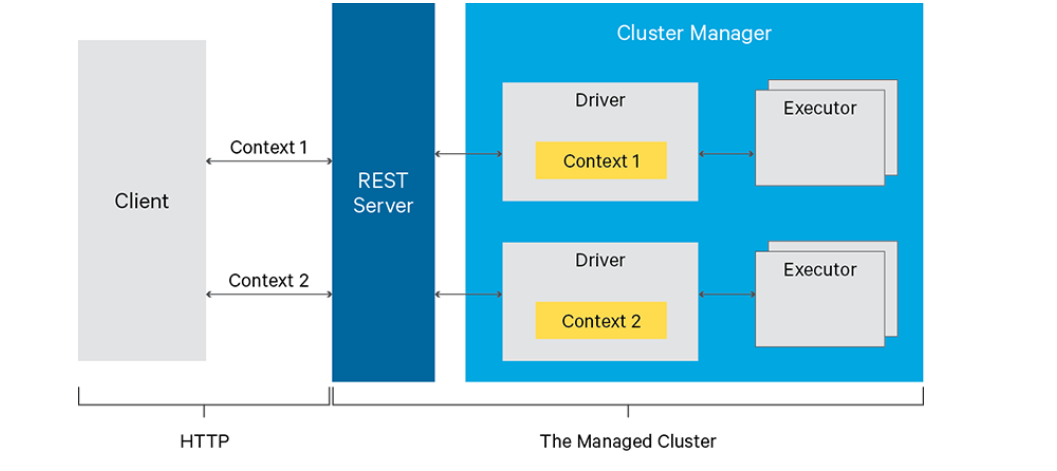
For detailed Spark workflows and notebook-specific Spark usage, see Guide for Jupyter Notebooks.
Deployment Overview
- JupyterLab:
- JupyterLab is enabled and preconfigured by default.
- Access from Modules > JupyterLab in the Ilum UI.
- Only one instance.
- Version control (Gitea) and Spark integration are ready-to-use.
-
JupyterHub
- JupyterHub (multi-user) is not enabled and preconfigured by default (use this guide to deploy).
- Access from Modules > JupyterHub in the Ilum UI.
- Each user receives a private JupyterLab instance.
- Version control (Gitea) and Spark integration are ready-to-use.
-
Zeppelin:
- Zeppelin is not enabled and preconfigured by default (use this guide to deploy).
- Access from Modules > Zeppelin in the Ilum UI.
- Pre-integrated with Livy Proxy and Spark.
Notebook Features in Ilum
All supported notebook environments provide:
- Executable, incremental cells (Python, Scala, SQL, Bash, etc.)
- Data visualization (charts, tables, widgets, dashboards)
- Integration with Spark clusters
- Access to Ilum storages and services
- Documentation via Markdown/HTML
- Data lineage and session management
- Collaboration and sharing options