AI Data Analyst Agent
The AI Data Analyst Agent is an Enterprise feature. Capabilities described on this page reflect the full Enterprise scope; specific features ship progressively across releases. Contact Ilum for current availability and enablement details.
Ilum includes an intelligent AI Agent assistant powered by Large Language Models (LLMs) with advanced retrieval capabilities over the platform's catalog, lineage, and documentation. This AI Data Analyst understands natural-language questions, generates optimized SQL queries, and provides clear explanations of results, making data analysis accessible to both technical and non-technical users.
Overview
The AI Data Analyst Agent is a dedicated, deployable service within Ilum that combines artificial intelligence with your data infrastructure to provide an interactive and intelligent data analysis experience. It serves as a bridge between natural language queries and complex SQL operations, enabling users to explore data through conversational interfaces.
Key Capabilities
- Natural Language Processing: Understands complex questions in plain English and translates them into appropriate SQL queries
- Contextual Awareness: Leverages workspace metadata, user roles, and active datasets to provide relevant and accurate responses
- SQL Generation: Automatically generates optimized SQL queries based on user requests
- Pipeline Integration: Creates pipeline stubs and chart specifications based on query context
- Interactive Execution: Allows users to edit, modify, and re-run generated SQL queries
- Learning System: Captures user feedback through thumbs up/down and edits for continuous improvement
Why Choose Ilum's Data Analyst Agent?
Ilum's Data Analyst Agent revolutionizes how organizations interact with their data by combining cutting-edge artificial intelligence with enterprise-grade data infrastructure. This powerful AI-powered SQL generator eliminates the complexity of traditional data analysis workflows, making advanced analytics accessible to both technical and non-technical users.
Transform Natural Language into SQL Queries
Our natural language to SQL converter understands complex business questions and automatically generates optimized database queries. Whether you're asking "What were our top-selling products last quarter?" or "Show me customer churn rates by region," the AI Data Analyst instantly translates your natural language queries into efficient SQL code, saving hours of manual query writing.
Enterprise-Ready AI for Data Teams
Unlike generic AI tools, Ilum's AI Data Analyst is specifically designed for enterprise data analytics:
- Context-Aware Intelligence: Understands your data schema, relationships, and business logic
- Role-Based Security: Respects user permissions and data access policies automatically
- Scalable Architecture: Handles large-scale data environments with millions of records
- Multi-Engine Support: Works with Spark SQL, Trino, and other popular query engines
Automated Business Intelligence and Reporting
The AI Data Analyst serves as an intelligent BI assistant that can:
- Generate complex analytical reports with simple conversational prompts
- Create data visualizations and chart specifications automatically
- Build reusable query templates and macros for common business analyses
- Integrate with existing dashboards and reporting workflows seamlessly
Key Competitive Advantages
Faster Time-to-Insight: Reduce query development time from hours to minutes with AI-generated SQL that's production-ready from the start.
Democratized Data Access: Enable non-technical stakeholders to explore data independently without requiring SQL expertise or constant support from data teams.
Enhanced Data Governance: Built-in security controls ensure users only access data they're authorized to see, maintaining compliance with enterprise data policies.
Continuous Learning: The system improves over time by learning from user feedback, query patterns, and organizational data usage, becoming more accurate and contextually aware.
Perfect for Modern Data Teams
Whether you're a data analyst looking to accelerate query development, a business user needing self-service analytics, or a data engineer building scalable data infrastructure, Ilum's AI Data Analyst adapts to your workflow and expertise level.
Architecture
The AI Data Analyst operates as an independent service within the Ilum ecosystem. It implements a Retrieval-Augmented Generation (RAG) architecture to ground Large Language Model (LLM) responses in the specific context of the organization's data catalog, ensuring high relevance and reducing hallucinations.
RAG Pipeline Implementation
The RAG pipeline consists of the following technical stages:
- Metadata Ingestion: The system continuously syncs with the Hive Metastore to ingest table schemas, column types, and comment annotations.
- Vectorization: Schema information and documentation are tokenized and converted into vector embeddings using the configured embedding model (e.g.,
text-embedding-ada-002). - Semantic Indexing: Vectors are stored in a specialized store (pgvector, ChromaDB) with HNSW (Hierarchical Navigable Small World) indexing for low-latency approximate nearest neighbor (ANN) search.
- Context Retrieval: Incoming natural language queries are vectorized to retrieve the most relevant table schemas and documentation chunks based on cosine similarity.
- Context Injection: The retrieved schema definitions are injected into the LLM system prompt within the token window limits, dynamically prioritizing the most relevant tables.
Component Interaction
- UI Component: WebSocket-based interactive chat interface utilizing React for state management.
- API Gateway: RESTful endpoints handling request validation, rate limiting, and routing.
- Orchestration Engine: Manages the agent loop, tool selection (MCP), and memory context.
- OAuth2 / OIDC: Validates JWT tokens and extracts user claims (roles, groups) for permission filtering.
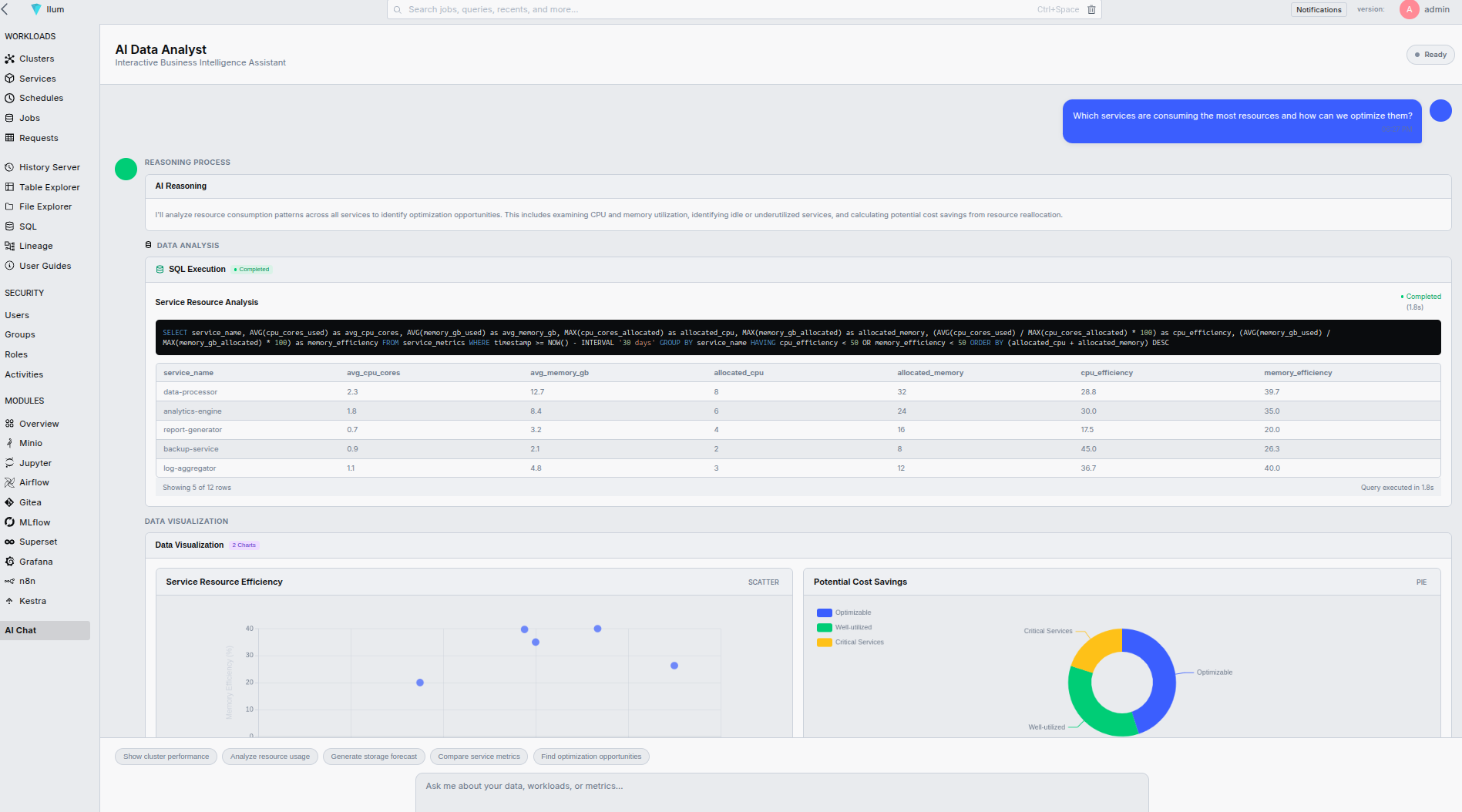
How the AI Agent Works
The AI Data Analyst operates as an intelligent AI Agent that autonomously reasons, plans, and executes data analysis tasks. Unlike simple chatbots or query generators, this AI Agent can understand context, make decisions, and take actions across the Ilum platform.
AI Agent Architecture
The AI Agent follows a sophisticated Perception → Reasoning → Planning → Action cycle:
- Perception Phase: The agent analyzes user input, current data context, and available resources
- Reasoning Phase: It applies domain knowledge to understand the user's intent and requirements
- Planning Phase: The agent creates an execution strategy, selecting appropriate tools and methods
- Action Phase: It executes the plan, generates SQL, runs queries, and provides explanations
Agent Decision-Making Process
Context-Aware Analysis
The AI Agent maintains awareness of:
- Current User Session: Previous queries, results, and conversation history
- Data Environment: Available databases, tables, schemas, and relationships
- User Permissions: Role-based access controls and data security boundaries
- System State: Active clusters, resource availability, and performance metrics
Intelligent Query Planning
When processing requests, the Agent:
- Analyzes Intent: Determines whether the user wants data exploration, reporting, analysis, or system operations
- Evaluates Context: Considers relevant tables, joins, filters, and aggregations needed
- Optimizes Approach: Selects the most efficient query pattern and execution strategy
- Validates Security: Ensures generated queries respect user permissions and data policies
Agent Learning and Memory
Short-Term Memory
- Conversation Context: Maintains context across multi-turn conversations
- Query History: Remembers previous queries and results within the session
- User Preferences: Adapts to user's preferred output formats and styles
Long-Term Learning
- Pattern Recognition: Learns from successful query patterns and user feedback
- Domain Knowledge: Builds understanding of organization-specific data patterns
- Performance Optimization: Remembers which queries work best for different scenarios
Autonomous Action Capabilities
The AI Agent can independently:
Data Discovery
- Schema Exploration: Automatically discover and understand table structures
- Relationship Mapping: Identify foreign keys and data relationships
- Data Profiling: Analyze data quality, distributions, and patterns
Query Optimization
- Performance Analysis: Evaluate query execution plans and suggest improvements
- Index Recommendations: Suggest database optimizations based on query patterns
- Resource Management: Choose appropriate cluster resources for different workloads
Error Handling and Recovery
- Self-Correction: Detect and fix common SQL syntax or logic errors
- Alternative Approaches: Try different query strategies if initial attempts fail
- Graceful Degradation: Provide partial results or explanations when full execution isn't possible
Integration with Ilum MCP Server
The AI Agent leverages the Model Context Protocol (MCP) to interact with Ilum services:
Available Actions
create_chart: Generate visualizations from query resultsrun_pipeline: Execute data processing workflowsschedule_job: Set up recurring analysis tasksupdate_dashboard: Modify existing dashboards with new insightsset_alert: Configure monitoring and notification rules
Action Planning
The Agent decides when and how to use these actions based on:
- User Intent: Explicit requests vs. implicit needs
- Data Context: Results that would benefit from visualization or further processing
- Workflow Integration: Opportunities to automate repetitive tasks
Feedback Loop and Continuous Improvement
Real-Time Adaptation
- User Corrections: Learns from manual edits to generated queries
- Thumbs Up/Down: Adjusts confidence scoring and query selection
- Conversation Flow: Improves dialogue management and response timing
Administrative Learning
- Query Success Rates: Tracks which types of queries work best
- Performance Metrics: Monitors response times and resource usage
- Error Patterns: Identifies common failure modes for improvement
Features
Natural Language Querying
The AI Data Analyst excels at interpreting natural language questions and converting them into executable SQL queries. Users can ask questions like:
- "Show me the top 10 customers by revenue last quarter"
- "What's the average processing time for jobs in the production cluster?"
- "Find all tables that contain customer information"
- "Which datasets haven't been updated in the last 30 days?"
Contextual Intelligence
The assistant leverages multiple sources of context to provide accurate and relevant responses:
- Workspace Metadata: Understanding of available tables, columns, and data relationships
- User Roles: Respect for access permissions and data security boundaries
- Active Datasets: Awareness of currently loaded and accessible data
- Historical Context: Learning from previous queries and interactions
SQL Generation and Optimization
The core function of the AI Data Analyst is translating natural language intent into dialect-specific SQL execution plans. The system ensures generated queries are syntactically correct, optimally structured, and security-compliant.
Multi-Dialect Support
The agent is aware of the specific SQL dialect of the underlying engine and adjusts syntax accordingly:
- Spark SQL: Utilizes Spark-specific functions such as
LATERAL VIEW EXPLODE,array_contains, and specific window function syntax. - Trino / Presto: Adapts to Trino's specific data types,
UNNESToperations, and lambda functions. - PostgreSQL: Generates standard SQL compliant with PostgreSQL syntax for internal metadata queries or connected JDBC sources.
Complex Query Patterns
The system supports generation of advanced SQL constructs:
- Common Table Expressions (CTEs): Decomposing complex logic into readable
WITHclauses. - Window Functions: Generating analytic queries using
RANK(),DENSE_RANK(),LEAD(), andLAG()over partitions. - Nested Data Processing: Handling
STRUCT,ARRAY, andMAPtypes common in Big Data formats like Parquet and Avro. - Temporal Analysis: Generating accurate date math and interval calculations specific to the engine (e.g.,
date_addvsINTERVAL).
Interactive Workflow
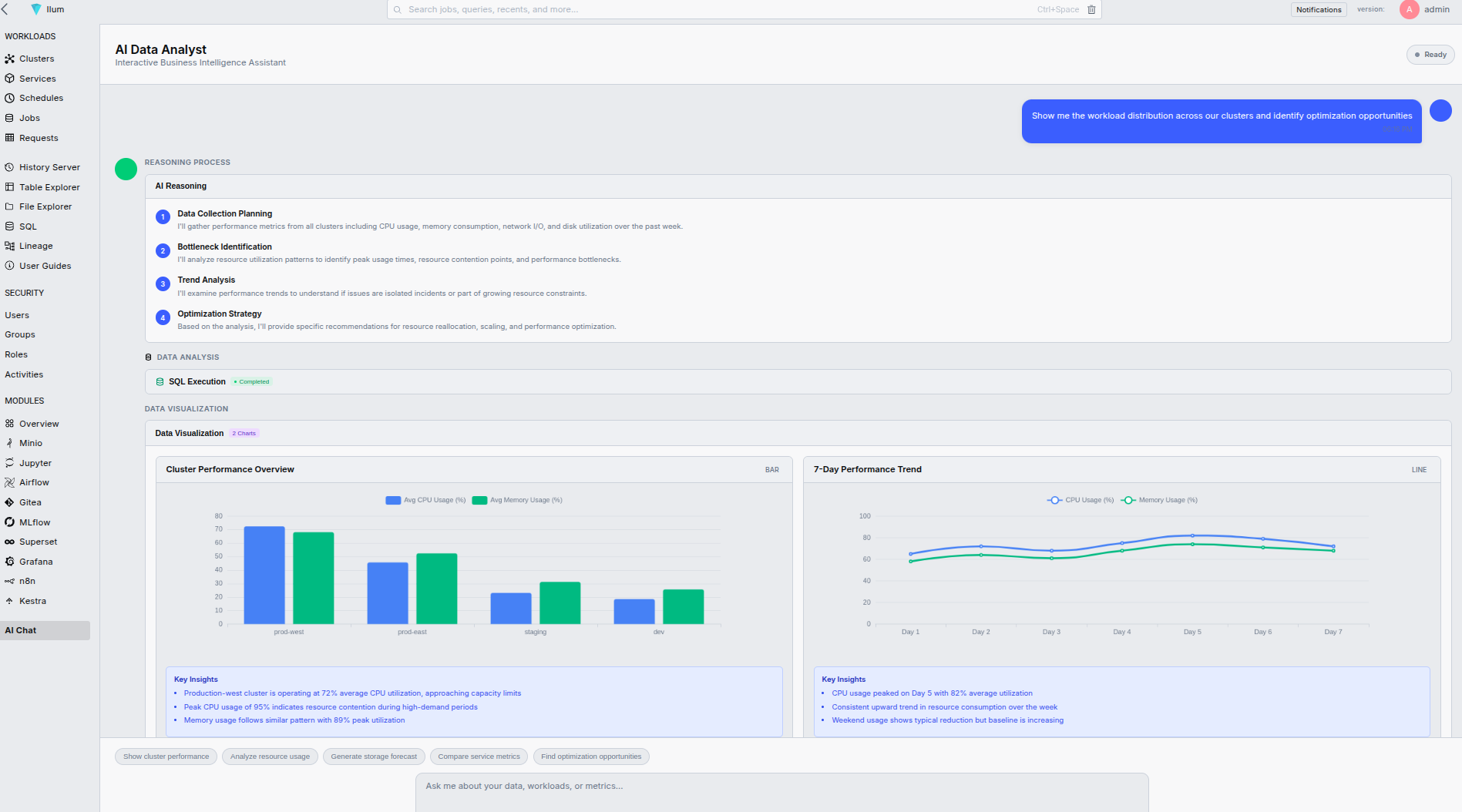
The AI Data Analyst provides a seamless workflow:
- Question Input: Users submit natural language queries
- Context Analysis: System analyzes available data and user permissions
- SQL Generation: Creates optimized SQL queries
- Result Explanation: Provides clear interpretation of results
- Iterative Refinement: Allows editing and re-execution of queries
MCP Server Integration
The AI Data Analyst integrates with the Ilum MCP server to enable actionable insights:
- Chart Creation: "Create a bar chart showing monthly sales trends"
- Pipeline Execution: "Run the data processing pipeline for this dataset"
- Dashboard Updates: "Add this analysis to the executive dashboard"
- Alert Configuration: "Set up monitoring for unusual data patterns"
Deployment and Configuration
Prerequisites
Before deploying the AI Data Analyst, ensure you have:
- Ilum core services running
- Hive Metastore configured for catalog access
- Appropriate LLM provider access (OpenAI, Azure OpenAI, or local models)
- Storage configured for embedding vectors and feedback data
Enabling AI Data Analyst (Enterprise License)
To enable the AI Data Analyst in your Ilum deployment:
helm upgrade ilum ilum/ilum \
  --set ilum-ai.enabled=true \
  --set ilum-ai.llm.provider=openai \
  --set ilum-ai.llm.apiKey=<your-api-key> \
  --set ilum-ai.embeddings.enabled=true \
  --reuse-values
Configuration Options
Advanced LLM Tuning
Beyond basic provider settings, you can tune the LLM's behavior to balance creativity with determinism:
ilum-ai:
  enabled: true
  llm:
    provider: openai  # openai, azure, local
    apiKey: "<your-api-key>"
    model: "gpt-4"
    # Controls randomness: 0.0 is deterministic, higher values are more creative
    temperature: 0.1
    # Penalizes new tokens based on their existing frequency in the text
    frequencyPenalty: 0.0
    # Controls the maximum number of tokens to generate
    maxTokens: 2048
    # System prompt override for organizational coding standards
    systemPrompt: |
      You are an expert Data Analyst. Always use explicit column names in SELECT statements.
      Never use SELECT *. Prefer Common Table Expressions (CTEs) for readability.
Vector Store Configuration
Configure the embedding model and vector database connection for the RAG pipeline:
Embedding Configuration
ilum-ai:
  embeddings:
    enabled: true
    provider: openai
    model: "text-embedding-ada-002"
    vectorStore: "pgvector"  # pgvector, chromadb, weaviate
Security Configuration
ilum-ai:
  security:
    oauth2:
      enabled: true
      provider: "keycloak"
    roleBasedAccess: true
    dataFiltering: true
Usage Examples
Basic Data Exploration
User Query: "What tables do we have in the sales database?"
AI Response:
SELECT table_name, table_comment
FROM information_schema.tables
WHERE table_schema = 'sales'
ORDER BY table_name;
The AI Data Analyst found 5 tables in the sales database: customers, orders, products, order_items, and sales_summary.
Advanced Analytics
User Query: "Show me the trend of order values over the last 6 months, broken down by product category"
AI Response:
SELECT
    DATE_FORMAT(o.order_date, '%Y-%m') as month,
    p.category,
    SUM(oi.quantity * oi.unit_price) as total_value
FROM orders o
JOIN order_items oi ON o.order_id = oi.order_id
JOIN products p ON oi.product_id = p.product_id
WHERE o.order_date >= DATE_SUB(CURRENT_DATE(), INTERVAL 6 MONTH)
GROUP BY DATE_FORMAT(o.order_date, '%Y-%m'), p.category
ORDER BY month, category;
This query analyzes order trends by calculating monthly totals for each product category over the past 6 months.
Performance Analysis
User Query: "Which Spark jobs took longer than 30 minutes to complete yesterday?"
AI Response:
SELECT
    job_id,
    job_name,
    cluster_name,
    start_time,
    end_time,
    TIMESTAMPDIFF(MINUTE, start_time, end_time) as duration_minutes
FROM ilum_jobs
WHERE DATE(start_time) = DATE_SUB(CURRENT_DATE(), INTERVAL 1 DAY)
    AND TIMESTAMPDIFF(MINUTE, start_time, end_time) > 30
ORDER BY duration_minutes DESC;
Found 3 jobs that exceeded 30 minutes runtime. The longest was the daily ETL job at 45 minutes.
Administrative Features
Feedback Collection
The AI Data Analyst automatically collects user feedback to improve performance:
- Thumbs Up/Down: Simple rating system for query quality
- Query Edits: Tracks manual modifications to generated SQL
- Usage Patterns: Monitors frequently asked questions and topics
- Error Tracking: Logs failed queries and their contexts
Operational Intelligence
Administrators gain deep visibility into the AI service operations through comprehensive metrics exposed via Prometheus:
Observability Metrics
- Latency Breakdown:
ilum_ai_ttft_seconds: Time-to-First-Token latency (user perception).ilum_ai_retrieval_duration_seconds: Time taken for vector search and metadata retrieval.ilum_ai_generation_duration_seconds: LLM processing time.
- Token Economics:
ilum_ai_tokens_prompt_total: Counter of input tokens sent to the LLM.ilum_ai_tokens_completion_total: Counter of generated output tokens.ilum_ai_context_window_usage: Percentage of context window utilized per request.
Semantic Caching
To reduce costs and latency, the system implements a Semantic Cache layer (Redis):
- Embedding Comparison: Incoming queries are vectorized and compared against cached query vectors.
- Similarity Threshold: If cosine similarity > 0.95, the cached SQL response is served immediately.
- TTL Management: Cache entries expire based on configured TTL (default 1h) to ensure data freshness.
Model Optimization
The system provides tools for continuous improvement:
- Prompt Engineering: Refine system prompts based on feedback
- Embedding Updates: Refresh knowledge base with new metadata
- Model Fine-tuning: Customize models for specific use cases
- Context Expansion: Add new data sources and documentation
Saved Queries and Macros
Users can save frequently used queries and create reusable macros:
Saving Queries
-- Save this query as "monthly_revenue_report"
SELECT
    DATE_FORMAT(order_date, '%Y-%m') as month,
    SUM(total_amount) as revenue
FROM orders
WHERE order_date >= DATE_SUB(CURRENT_DATE(), INTERVAL 12 MONTH)
GROUP BY month
ORDER BY month;
Creating Macros
Users can create parameterized macros for common analyses:
-- Macro: customer_analysis(customer_id, start_date, end_date)
SELECT
    c.customer_name,
    COUNT(o.order_id) as order_count,
    SUM(o.total_amount) as total_spent,
    AVG(o.total_amount) as avg_order_value
FROM customers c
JOIN orders o ON c.customer_id = o.customer_id
WHERE c.customer_id = ${customer_id}
    AND o.order_date BETWEEN '${start_date}' AND '${end_date}'
GROUP BY c.customer_id, c.customer_name;
Integration with Ilum Ecosystem
The AI Data Analyst seamlessly integrates with other Ilum components:
Table Explorer Integration
- Automatic Discovery: Discovers tables and relationships from Hive Metastore
- Schema Awareness: Understands table structures and data types
- Lineage Context: Uses data lineage information for better query suggestions
SQL Editor Integration
- Query Handoff: Generated queries can be opened in the SQL Editor for editing
- Execution Context: Shares execution engines and cluster configurations
- Result Sharing: Enables collaborative analysis workflows
Monitoring Integration
- Job Tracking: Monitors AI-generated query executions
- Performance Analysis: Provides insights into query performance
- Resource Usage: Tracks computational resources for AI operations
Troubleshooting
Log Analysis & Troubleshooting
Common Log Patterns
ContextLengthExceededError
ERROR [AiService] Token limit exceeded: 8500 tokens used (limit: 8192).
Action: Reduce 'retrieval_limit' in configuration or switch to a model with larger context window (e.g., gpt-4-32k).
MetadataSyncFailure
WARN [MetadataSync] Failed to vectorize table 'sales.orders': column 'metadata' contains binary data.
Action: Check Hive Metastore for unsupported column types or corrupt table statistics.
HallucinationDetected (Self-Correction)
INFO [QueryValidator] Generated SQL referenced column 'total_rev' which does not exist in 'sales_daily'. Correcting to 'total_revenue'.
Action: System auto-corrected the query using schema validation.
Troubleshooting Steps
- Slow RAG Retrieval: If
ilum_ai_retrieval_duration_secondsis high (>2s), check the vector store index. Ensure HNSW indexes are built:CREATE INDEX ON embeddings USING hnsw (vector vector_cosine_ops); - Authentication Failures: Verify the OIDC provider's JWKS endpoint reachability from the Ilum AI pod.
- Low Quality Responses: Inspect the
system_prompteffectively injected into the LLM context via debug logs (enableilum.ai.debug=true).
Authentication Issues
For OAuth2 authentication problems:
- Verify Provider Configuration: Check OAuth2 settings and endpoints
- Review Token Expiration: Ensure tokens are being refreshed properly
- Check Role Permissions: Verify user roles have appropriate access
- Validate SSL Certificates: Ensure secure connections are working
Performance Optimization
Vector Store Optimization
-- Optimize vector store indexes
CREATE INDEX idx_embeddings_similarity ON embeddings
USING ivfflat (embedding vector_cosine_ops)
WITH (lists = 100);

-- Regular cleanup of old embeddings
DELETE FROM embeddings
WHERE created_at < NOW() - INTERVAL '30 days';
Cache Configuration
Enable response caching for better performance:
ilum-ai:
  cache:
    enabled: true
    ttl: 3600  # 1 hour
    maxSize: 1000
    type: "redis"
    redis:
      host: "ilum-redis"
      port: 6379
Security Considerations
Query Interception & Validation Layer
The AI Data Analyst does not simply pass generated SQL to the execution engine. It employs a rigorous interception layer:
- AST Analysis: Generated SQL is parsed into an Abstract Syntax Tree (AST).
- Permission Validation: The AST is traversed to verify that the requesting user has
SELECTprivileges on all referenced tables and columns. - Command Restriction: Operations strictly limited to read-only (SELECT, SHOW, DESCRIBE). DDL/DML operations (DROP, DELETE, UPDATE) are rejected at the parser level.
PII & Sensitive Data Handling
The system integrates a privacy preservation layer for handling sensitive data:
- PII Detection: Regex and NLP-based classifiers identify potential Personally Identifiable Information (PII) in query results (e.g., emails, SSNs).
- Dynamic Masking: Detected sensitive fields can be automatically masked (e.g.,
j***@example.com) before being returned to the UI. - Audit Logging: Original queries and masked results are logged with a cryptographic hash of the user identity for immutable audit trails.
Compliance
For regulatory compliance:
- GDPR Compliance: Supports data deletion and privacy requests
- SOX Compliance: Maintains audit trails for financial data access
- HIPAA Compliance: Implements healthcare data protection measures
- SOC2 Compliance: Follows security and availability standards
Best Practices
Effective Query Formulation
To get the best results from the AI Data Analyst:
- Be Specific: Provide clear context and desired outcomes
- Use Domain Terms: Include relevant business terminology
- Specify Time Ranges: Always include date constraints when relevant
- Define Metrics: Clearly specify how calculations should be performed
Data Preparation
Optimize your data for AI analysis:
- Consistent Naming: Use clear, consistent column and table names
- Proper Documentation: Maintain up-to-date table and column comments
- Data Quality: Ensure data is clean and well-structured
- Metadata Enrichment: Add business context to technical metadata
Collaboration Workflows
Establish effective team workflows:
- Shared Queries: Use saved queries for common analyses
- Documentation: Document complex queries and their business purpose
- Review Process: Implement peer review for critical analyses
- Version Control: Track changes to important queries and macros
API Reference
The AI Data Analyst provides REST API endpoints for programmatic access:
Query Generation
POST /api/v1/ai/generate-query
Content-Type: application/json
Authorization: Bearer <token>

{
  "question": "Show me top customers by revenue this quarter",
  "context": {
    "database": "analytics",
    "user_role": "analyst"
  }
}
Query Execution
POST /api/v1/ai/execute-query
Content-Type: application/json
Authorization: Bearer <token>

{
  "sql": "SELECT customer_name, SUM(revenue) FROM...",
  "cluster_id": "prod-cluster-1"
}
Feedback Submission
POST /api/v1/ai/feedback
Content-Type: application/json
Authorization: Bearer <token>

{
  "query_id": "12345",
  "rating": "positive",
  "comment": "Query was accurate and well-optimized"
}