Hive Catalog
Overview
The Hive Catalog is a widely used metadata catalog for Spark, Hadoop, and big data environments. At its core, it stores table schemas, locations, and other metadata in a central database called the Hive Metastore. This makes it possible for Spark and other compute engines to consistently find and access tables across multiple jobs and sessions.
In simpler terms, Hive Catalog is like a registry or "table of contents" for your data lake. It keeps track of which tables exist, their schemas, partitions, and where their data physically resides (for example, on HDFS, S3, or MinIO).
Ilum deeply integrates Hive Catalog, making it the default catalog for all SQL queries, jobs, and groups unless another is specified.
Unlike Git-like catalogs (e.g., Nessie), Hive only tracks the latest state of each table; it does not support branching, commit history, or time travel across the entire catalog. However, it is reliable, mature, and universally compatible with a huge ecosystem.
Hive vs. Other Data Catalogs
Here’s how Hive Catalog compares with modern alternatives like Nessie or AWS Glue:
-
No Version Control: Hive keeps only the most recent version of each table. It does not support branching, tagging, or commit history at the catalog level. To track historical states, you must rely on table-format-specific features (like Iceberg’s or Delta’s time travel), not Hive itself.
-
Centralized Metadata: Table schemas, locations, and partitioning are stored in the Hive Metastore database. This ensures consistent metadata across all Spark jobs and engines using the catalog.
-
Universal Compatibility: Hive Metastore is supported by nearly all big data engines (Spark, Hive, Trino, Flink, etc.), making it a safe default for mixed-technology environments.
-
No Multi-table Transactions: Catalog-level atomic transactions (covering multiple tables at once) are not supported. Each DDL/DML operation is handled separately.
-
No Branch Isolation: To isolate dev/staging/prod environments, you must maintain multiple catalogs or databases, or physically copy data. There is no "branching" mechanism built in.
Core Concepts in Hive Catalog
Hive Metastore
The Hive Metastore is a service and a backing database (often PostgreSQL or MySQL) where all metadata about tables, views, and partitions is stored.
Whenever Spark or another engine queries a table, it looks up the details in the Hive Metastore.
Tables, Databases, and Storage
- Tables define the schema and storage location of your datasets.
- Databases in Hive are namespaces for grouping related tables.
- Warehouse Location is the root folder (on HDFS, S3, or other storage) where table data files reside.
Using Hive Catalog in Ilum
Ilum automatically configures the Hive Catalog as the default for Spark jobs, SQL Viewer queries, and pipeline groups.
You can run standard SQL commands such as:
CREATE DATABASE IF NOT EXISTS mydb;
CREATE TABLE IF NOT EXISTS mydb.sales (date STRING, amount INT);
INSERT INTO mydb.sales VALUES ('2025-06-01', 1000);
SELECT * FROM mydb.sales;
Spark Configuration for Hive
If you run Spark manually, set these parameters to enable Hive support:
spark.sql.catalogImplementation=hive
spark.hadoop.hive.metastore.uris=thrift://ilum-hive-metastore:9083
However, Ilum handles this for you in all standard workflows. No manual configuration is required.
Setting up the Hive Metastore in Ilum
Normally, using Hive Catalog requires:
- Installing the Hive Metastore service.
- Configuring a backing database (like PostgreSQL or MySQL) for metadata.
- Connecting the service to your object storage (HDFS, S3, MinIO, GCS, WASBS).
- Setting up security, network, and storage options.
Ilum automates all of these steps!
When you deploy Ilum via Helm, it provisions the Hive Metastore, database, and object storage integration for you.
Enabling Hive Metastore
To enable Hive Metastore in Ilum, add these flags to your Helm upgrade/install:
helm upgrade  \
    --set ilum-hive-metastore.enabled=true \
    --set ilum-core.metastore.enabled=true \
    --set ilum-core.metastore.type=hive \
    --reuse-values ilum ilum/ilum
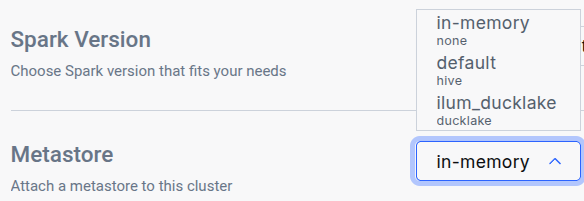
After running the helm upgrade command, navigate to the Edit Cluster tab for the cluster where you want to use the catalog and select it in the General metastore dropdown:
Using Custom PostgreSQL Credentials
If you want to use a custom PostgreSQL database for the Hive Metastore:
helm upgrade \
    --set postgresql.auth.username=customuser \
    --set postgresql.auth.password="CHOOSE PASSWORD"  \
    --reuse-values ilum ilum/ilum
Configure Hive Metastore to use those credentials:
helm upgrade \
    --set ilum-hive-metastore.postgresql.auth.password="CHOOSE PASSWORD" \
    --set ilum-hive-metastore.postgresql.auth.username=customuser \
    --reuse-values ilum ilum/ilum
Setting up Hive Metastore: Storage
Storage, also referred to as a Warehouse, is the location where the actual data is stored. Hive supports various storage backends, including:
- HDFS (Hadoop Distributed File System)
- Amazon S3 Buckets and MinIO
- Google Cloud Storage (GCS)
- Windows Azure Storage Blob (WASBS)
Typically, you would need to set up one of these storage options and configure Hive's metastore connection accordingly within an XML file.
However, with Ilum, the S3 MinIO storage is pre-configured for you, and the Hive Metastore is already set up to use it by default. Configuring Other Storage Backends
If you prefer to use an alternative storage backend, you can configure Hive to work with it by reconfiguring your helm values:
For S3 storage or MinIO:
helm upgrade
    --set ilum-hive-metastore.storage.type="s3" \
    --set ilum-hive-metastore.storage.metastore.warehouse="s3a://yourbucket/yourfolder" \
    --set ilum-hive-metastore.storage.s3.accessKey="your_access_key" \
    --set ilum-hive-metastore.storage.s3.secretKey="your_secret_key" \
    --set ilum-hive-metastore.storage.s3.host="yourhost" \
    --set ilum-hive-metastore.storage.s3.port=yourport \
    --reuse-values ilum ilum/ilum
For GCS:
helm upgrade
    --set ilum-hive-metastore.storage.type="gcs" \
    --set ilum-hive-metastore.storage.metastore.warehouse="gs://my-gcs-bucket/path/to/folder/" \
    --set ilum-hive.metastore.storage.gcs.clientEmail="your@email" \
    --set ilum-hive-metastore.storage.gcs.privateKey="yourprivatekey" \
    --set ilum-hive-metastore.storage.gcs.privateKeyId="privatekeyid" \
    --reuse-values ilum ilum/ilum
For WASBS:
helm upgrade
    --set ilum-hive-metastore.storage.type="wasbs" \
    --set ilum-hive-metastore.storage.metastore.warehouse="wasbs://[email protected]/path/to/folder/" \
    --set ilum-hive-metastore.storage.wasbs.accountName="youraccountname" \
    --set ilum-hive-metastore.storage.wasbs.accessKey="youraccesskey" \
    --reuse-values ilum ilum/ilum
For HDFS:
Here you will require specify your hdfs configurations in
ilum-hive-metastore.storage.hdfs.config
You can provide them in hdfs-config.yaml:
helm upgrade
    --set ilum-hive-metastore.storage.type="hdfs" \
    --set ilum-hive-metastore.storage.metastore.warehouse="hdfs://node:port/path/to/folder" \
    --set ilum-hive-metastore.storage.hdfs.hadoopUsername="yourusername" \
    --reuse-values ilum ilum/ilum \
    -f hdfs-config.yaml
Hive 4 deployment
Ilum supports Apache Hive 4.x metastores alongside the default Hive 3.x deployment. A single Ilum instance can serve both versions concurrently — each Metastore record routes to the correct backend automatically based on its version field.
When to use Hive 4
- New transactional metadata features (
SCHEDULED_QUERIES,STORED_PROCS,DATACONNECTORS, REST catalog). - Smaller standalone-metastore distribution (~443 MB image vs. 1.4 GB full Hive distribution).
- Schema migrations are simpler —
schematool -initOrUpgradeSchemais idempotent in Hive 4.
Differences from Hive 3 you should know
- The Hive 4 image is operations-only —
start-metastoreandschematool. There is nohiveCLI, nobeeline, nometatool. If operators rely onmetatoolfor-listFSRoot,-updateLocation, or-executeJDOQL, keep a Hive 3 deployment. - A Hive 3 client cannot drive a Hive 4 server. Spark's bundled Hive client is older than Hive 3, so any cluster querying a Hive 4 metastore must use the matching Spark image (see "Spark: use the Hive 4 Spark image" below).
- Migration from Hive 3 to Hive 4 is in place — Ilum runs
schematoolin-initOrUpgradeSchemamode whenmajorVersion: 4is set, and existing databases, tables, partitions, and column statistics are preserved without a data dump. The upgrade is idempotent, so re-running against an already-v4 schema is a no-op. A single Postgres database can only host one Hive schema version at a time, so running v3 and v4 side by side requires separate databases (see "Mixed v3 + v4" below).
Helm: deploying a Hive 4 metastore
helm upgrade ilum ilum/ilum \
    --set ilum-hive-metastore.image=ilum/hive:4.2.0 \
    --set ilum-hive-metastore.majorVersion=4 \
    --set ilum-core.metastore.hive.version=4.2.0 \
    --reuse-values
All three flags are required and must be set in lockstep:
ilum-hive-metastore.image— the Hive 4 image. Use Ilum's publishedilum/hive:4.2.0; the stock upstreamapache/hive:standalone-metastore-4.ximages lack the PostgreSQL JDBC driver and cannot connect to the bundled PostgreSQL backend.ilum-hive-metastore.majorVersion— selects v4 mode in the metastore chart (init/upgrade behavior and start command).ilum-core.metastore.hive.version— should match the Hive 4 image's version. The Ilum backend uses the major component to route between the Hive 3 and Hive 4 clients; values starting with4.select the Hive 4 client.
Helm rejects an install or upgrade that sets these inconsistently — the chart's template-time check fires with a clear error naming the two flags that need to align. The check applies only when the bundled metastore is enabled and the Ilum backend is configured to target it; deployments using an external Hive Metastore are not gated by the check.
Upgrading an existing Hive 3 deployment in place
The same three flags upgrade an existing Hive 3 deployment to Hive 4 in place, preserving the contents of the metastore database. The upgrade has been verified end-to-end against a populated Hive 3 database: existing tables remain queryable and writes continue to succeed after the upgrade.
Pre-flight
- Snapshot the metastore database. Always take a backup before upgrading production data, even though the upgrade is designed to be resumable on failure.
- Plan a maintenance window. The metastore is unavailable while the schema upgrade runs. Expect under two minutes on a small metastore (< 10k tables); larger catalogs take proportionally longer.
Run the upgrade
-
Run
helm upgradewith the three lockstep flags. Helm will reject the command if any of the three is missing or inconsistent.helm upgrade ilum ilum/ilum \
--reuse-values \
--set ilum-hive-metastore.image=ilum/hive:4.2.0 \
--set ilum-hive-metastore.majorVersion=4 \
--set ilum-core.metastore.hive.version=4.2.0 -
Wait for the Hive Metastore and Ilum backend Pods to roll out. The new Hive Metastore Pod runs the schema upgrade in its init container before serving requests.
kubectl rollout status -n $NS sts/ilum-hive-metastore
kubectl rollout status -n $NS deploy/ilum-core
Update the cluster's Spark image
- Spark clusters attached to a Hive 4 metastore must run the matching Spark image. Set the default cluster's container image to the
-delta-hive4variant either in the Edit Cluster UI (set Container image toilum/spark:4.1.2-delta-hive4) or via API ondefaultApplicationConfig.spark.kubernetes.container.image. The Spark configuration needed to use the v4 client is injected automatically; selecting the image is the only required step.
Verify
-
Confirm post-upgrade health via the API:
GET /api/dev/reactive/metastorereturns the default metastore record withversion="4.2.0". -
Run a representative SQL workload to confirm pre-upgrade tables are still queryable and writes still succeed:
SHOW DATABASES;
SHOW TABLES IN <db>;
SELECT * FROM <db>.<table> LIMIT 10;
INSERT INTO <db>.<table> VALUES (...);
Rollback
To roll back, restore the metastore database from the snapshot taken in step 1, then re-run helm upgrade with the original Hive 3 flags (ilum-hive-metastore.image=ilum/hive:3.1.3, ilum-hive-metastore.majorVersion=3, ilum-core.metastore.hive.version=3.1.3) and swap the cluster's Spark image back to the standard (non -hive4) variant.
Helm values are the source of truth for the default metastore
The default Metastore record is created from the Ilum backend's helm values at startup. The address, version, and warehouseDir fields are overwritten from helm on every pod restart, so a helm upgrade that changes any of them takes effect automatically on the next rollout. The description and configuration fields are preserved across restarts and are the right place for per-deployment customisations (such as extra Spark or Hive client settings).
Changes made to address, version, or warehouseDir directly through the API or UI will not survive a restart. To change them durably, update the helm values and run helm upgrade.
For deployments that use an externally-managed Hive Metastore, ilum-core.metastore.hive.version is the operator's responsibility to keep aligned with the external service's actual major version.
Spark: use the Hive 4 Spark image
Stock Spark images cannot drive a Hive 4 metastore because their bundled Hive client is too old. Ilum publishes a Spark image with the Hive 4 client pre-staged:
ilum/spark:4.1.2-delta-hive4
Set this as the cluster's container image whenever the cluster is attached to a Hive 4 metastore:
- In the Edit Cluster UI, set Container image to
ilum/spark:4.1.2-delta-hive4. - Or via API on the cluster's
defaultApplicationConfig:spark.kubernetes.container.image=ilum/spark:4.1.2-delta-hive4.
No further Spark configuration is needed; the relevant settings are injected automatically when the metastore record's version starts with "4.". The image is compatible with Hive 4.0, 4.1, and 4.2 metastores.
To use a custom Spark image with the Hive 4 client at a different path, set spark.sql.hive.metastore.jars on the metastore record's configuration map — the entry there takes precedence over the default.
Mixed v3 + v4 in one Ilum instance
Both a Hive 3 and a Hive 4 Metastore can be registered in the same Ilum instance — Ilum routes per-record to the matching client. Two extra constraints when running them side by side:
- Separate Postgres databases. A single database can host only one Hive schema version. Set
--set ilum-hive-metastore.postgresql.database=metastore_v4(or any unused name) on the Hive 4 release; Hive 3 stays on the defaultmetastoredatabase. The umbrella chart'spostgresExtensions.databasesToCreateneeds the extra database name so the bootstrap job creates it. - Two clusters. Each cluster's Spark image must match its metastore's Hive version. Run two clusters and attach each to the corresponding metastore record.
Best Practices and Recommendations
- Use Hive for Maximum Compatibility: Hive Metastore is the universal “common denominator” for big data engines.
- For Version Control, Use Iceberg or Nessie: If you need branching, time travel, or commit history, combine Hive Catalog with a table format (like Iceberg) that supports these features, or use Nessie as your catalog.
- Secure Your Metastore: Always use strong credentials and network restrictions for your Hive Metastore database and service.
- Monitor Warehouse Storage: Make sure your warehouse (MinIO, S3, HDFS, etc.) is backed up and monitored for health and available space.
Learn More
For more on using Hive Catalog, see the Hive Metastore documentation.
For detailed Ilum configuration and Helm reference, visit the Ilum Getting Started guide.
Hive Catalog in Ilum combines ease of use, automation, and broad compatibility, giving you a robust foundation for SQL analytics and data engineering at scale.